How to Use Comic Style Prompts to Match Your Story's Mood
A practical guide to choosing and writing the right art style so your comic pages feel like they belong to one story.
The style question
Art style is the single setting that affects every image in your project. Get it right once, and your whole comic feels like one unified visual story. Get it wrong, and even strong scenes feel disconnected.
Where the style setting lives
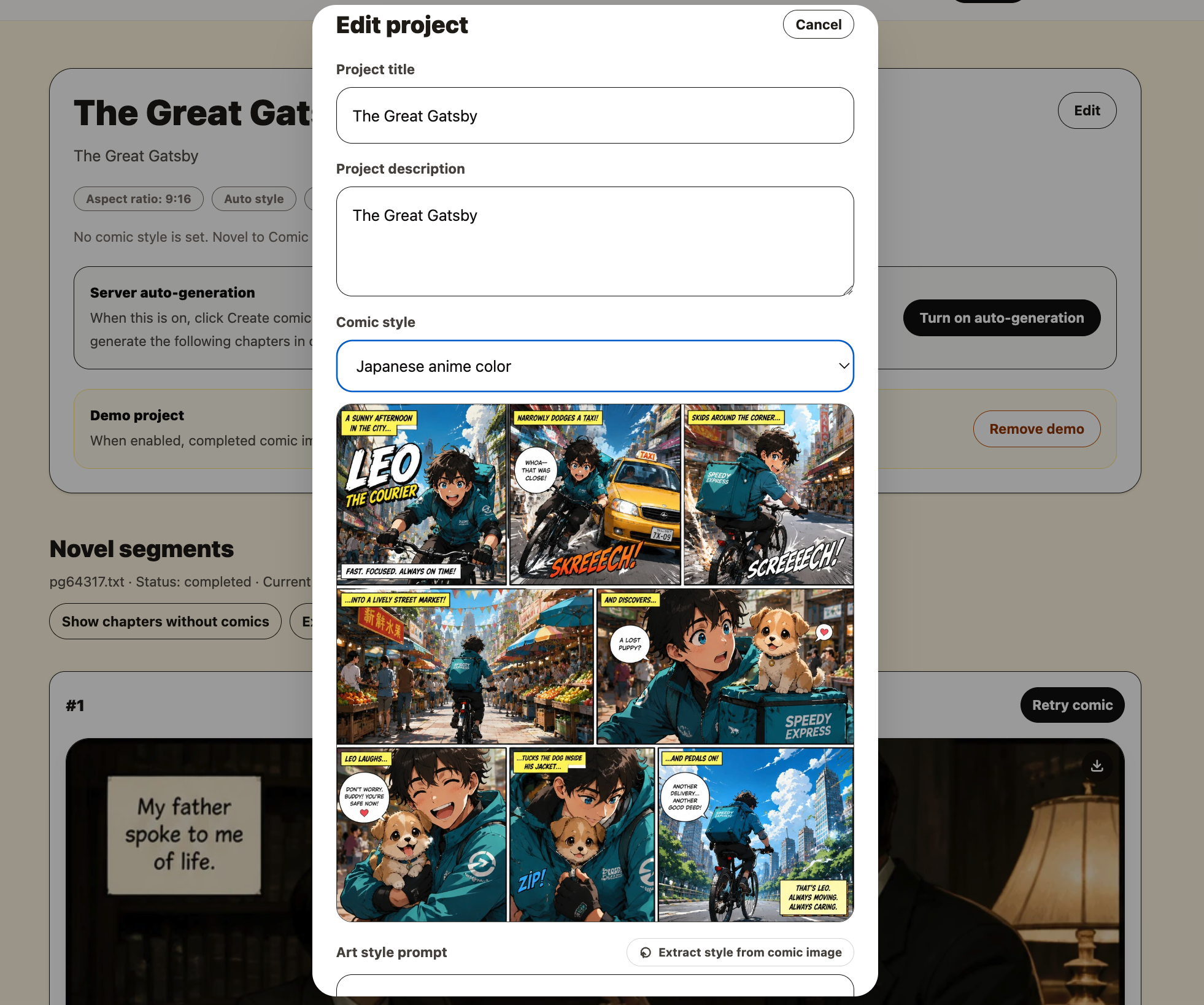
In your project, the comic style is set in the project settings panel. You will find a comic style dropdown with 6 built-in preset options and a text field where you can write or paste your own custom style description.
Every comic image generated in the project uses this style. You can change it before drawing new pages, but pages that are already drawn keep the style they were created with. This means it is worth spending a moment on the style before you ask the assistant for your first chapter.
The 6 built-in style presets
Each preset is a starting point designed for a common genre and visual direction. Selecting one fills the style prompt automatically. You can use it as-is or edit the text to adjust it further.
Cinematic semi-real
Realistic faces with anime eyes, soft rim light, shallow depth of field, filmic color. Best for literary fiction, thrillers, grounded fantasy.
Japanese anime
Clean even lines, large glossy eyes, cel shading, bright airy palette. Best for romance, school stories, light novels.
Vibrant shonen anime
Bold outlines, high-contrast shading, speed lines and impact bursts. Best for battles, tournaments, isekai adventures.
Korean webtoon
Delicate lines, refined faces, soft airbrushed shading, pastel glow. Best for romance fantasy, modern romance, drama.
Chinese manhua
Elegant figures, flowing robes, painted rendering, ink-wash mountains. Best for xianxia, wuxia, palace and historical stories.
Western graphic novel
Thick inked outlines, cross-hatched shadows, moody limited palette. Best for crime, noir, horror, war stories.
How to write your own style prompt
The custom style field accepts free-form text. You can be as specific or as broad as you like. The style prompt sits alongside the story scene text when the image is generated, so details you put here will influence the look of every panel.
Good style prompts describe the visual language of the images, not the story content. Think about line quality, color temperature, lighting approach, reference artists or titles, and the overall emotional tone you want the visuals to carry.
Short reference approach
"One Piece manga style"
"Akira Toriyama character design"
"Franco-Belgian bande dessinée"
"Marvel ink and halftone"
Using a title or artist name as shorthand is supported. The system will use that as a visual reference point.
Detailed descriptor approach
"Thin ink line art, muted earth tones, soft pencil shading, candlelit scenes with warm orange light, no speed lines, quiet mood"
Detailed prompts give you precise control over the look, especially when you want something that does not match a well-known reference.
How to extract a style from a comic reference image
If you already have a comic page or panel that looks exactly the way you want your project to look, you can use the style extraction feature. Click Extract style from comic image in the project settings, upload the reference image, and the system will analyze the visual style and generate a text description.
The extracted text is automatically placed in the custom style field. You can read it, edit it if needed, and then save it as the project style. This feature costs 5 credits and works best with clean comic panel images — not general photos or screenshots of text.
Matching style to story mood: a quick reference
| Story mood | Suggested preset | Custom prompt element to add |
|---|---|---|
| Epic battle sequences | Vibrant shonen anime | speed lines, dramatic pose, high contrast |
| Tender romance | Korean webtoon | soft lighting, warm pastel palette, gentle expressions |
| Gloomy mystery | Western graphic novel | fog, heavy shadows, isolated figures, noir lighting |
| Ancient China/Japan | Chinese manhua | traditional clothing, architecture, brush texture |
| Dark sci-fi | Cinematic semi-real | neon city at night, rain-slicked streets, glowing screens |
| Whimsical fantasy | Japanese anime | soft watercolor washes, playful creatures, natural magic |
| Psychological tension | Western graphic novel | muted grays, claustrophobic framing, harsh single light |
Set the style before page one
The style you choose follows every page in your project. Spend five minutes picking the right starting point, generate a test image, and adjust if needed. Getting the style right at the start saves you from regenerating pages later.
Start your project