
ChatGPT vs an AI Comic Generator: Which Is Better for Turning a Whole Story into a Comic?
ChatGPT can draw a great comic page. A forty-chapter novel is a different job. An honest comparison of the two approaches, where each one breaks, and a prompt kit if you choose ChatGPT.
The short answer
For one page or a short strip, use ChatGPT. For a story with chapters and a recurring cast, use a tool that stores your characters and files your pages — or be ready to do that bookkeeping yourself.
If you ask ChatGPT for a comic page, you will probably get a good one. That is exactly why so many writers start there — and why so many stop around page six, when the hero has quietly become someone else and the pages are scattered across three conversations.
The problem is not the quality of the image. It is that a comic of a novel is a long project, and a chat is built for one exchange at a time. This guide compares the two honestly, so you can pick the one that matches the size of your story.
Why faces drift in a chat
An image model draws every picture from scratch. When you write "the same girl as before", it does not look her up anywhere; it draws a new girl who matches the words. Words like "red hair, green eyes, slim" describe thousands of different faces, so each picture lands on a slightly different one.
The fix is always the same: show the model a picture of the character every time. In a chat, that picture is something you have to keep and attach yourself. In a comic tool, it is a reference sheet stored with the project and attached to every page for you.
Side by side
One page, one joke, one idea
A general chat assistant
Excellent. Fast, flexible, and you can talk it into almost any look.
A project-based comic tool
Works, but setting up a project for a single image is more than you need.
Keeping a face across 5 pages
A general chat assistant
Possible in one conversation if you attach the same reference image every time and repeat the description.
A project-based comic tool
Automatic. The character sheet is attached to every page that shows them.
Keeping a face across 50 pages and many sessions
A general chat assistant
This is where it gets hard. You become the librarian: saving reference images, re-uploading them, re-pasting descriptions.
A project-based comic tool
The library holds every sheet, so chapter 40 is drawn from the same sheet as chapter 1.
A character who changes mid-story
A general chat assistant
You track which image to use for which chapter yourself.
A project-based comic tool
A new version applies from the chapter you choose; earlier chapters keep the earlier look.
Reading the novel
A general chat assistant
You paste each scene and decide how to split it into pages.
A project-based comic tool
The assistant reads each chapter from the book and decides how many pages it needs.
Keeping pages in order
A general chat assistant
Images live in a chat history; you download and file them.
A project-based comic tool
Pages are filed under their chapter, in reading order, and download as one ZIP.
Fixing page 2 of chapter 14
A general chat assistant
Find the right conversation, re-establish the characters, regenerate.
A project-based comic tool
Ask for that page again; it is redrawn in place with the same sheets.
How you pay
A general chat assistant
A monthly subscription that also covers everything else ChatGPT does.
A project-based comic tool
Credits per page, refunded when a page fails, with no subscription.
If you choose ChatGPT: a prompt kit that holds up longer
ChatGPT is a reasonable choice for a short comic. These habits keep it consistent for as long as possible:
- Make a character sheet first. Ask for one image of each main character, front view, full body, plain background, in the outfit they wear in the story. Save those images.
- Write a fixed description of each character — age, build, face, hair, the outfit — and paste it unchanged into every request. Do not paraphrase it; new words mean a new face.
- Attach the sheets of everyone in the panel to every request, and say which image is which person.
- Plan the page in text before asking for the image: four panels, one line each saying who is there, what happens and where the camera is.
- Keep one conversation per chapter and name your downloads by chapter and page, so you can find them again.
A page request you can copy
Image 1 is Mara (attached). Image 2 is Tobin (attached). Keep their faces and outfits exactly as in the images. Draw one comic page, four panels, in the same style as the attached images. Panel 1: Mara and Tobin push through a crowded night market — wide shot. Panel 2: Tobin spots a man in a grey hood watching them — close-up on Tobin. Panel 3: The hooded man slips away between stalls — over-the-shoulder. Panel 4: Mara grabs Tobin's sleeve. Mara: "Not here." — medium shot.
That works. It is also, in effect, what a comic tool does for you on every page: a reference block naming each image, a fixed description of each character, and a panel plan written from the chapter.
What the project approach looks like
In Novel2Comic, the bookkeeping lives in the material library. The comic AI assistant reads a chapter, checks the library for everyone who appears, draws a sheet for a recurring character who does not have one yet, and draws every page with the right sheets attached. These are the real sheets from a ten-chapter adaptation of "The Necklace":
Material library
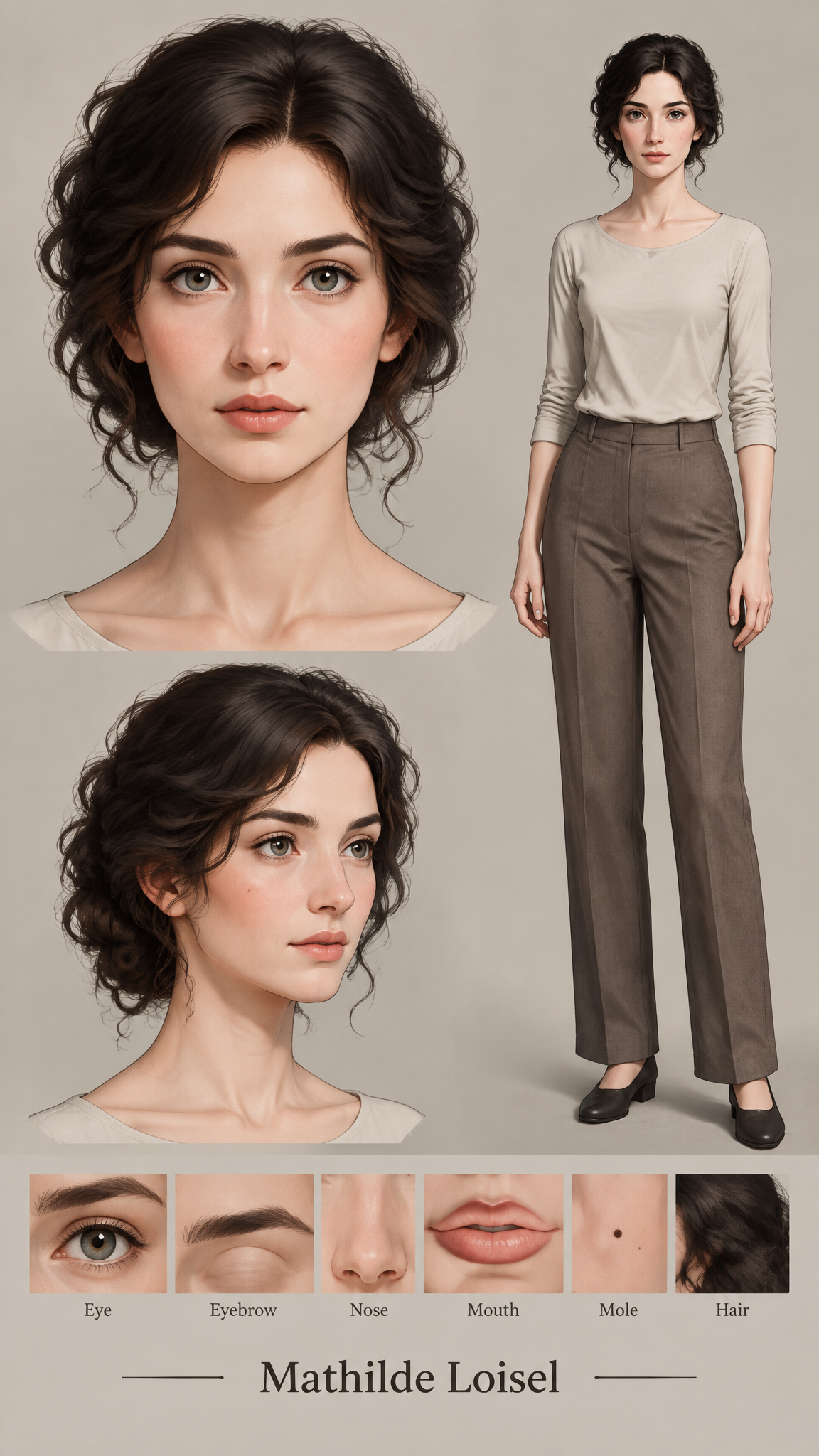
Story character
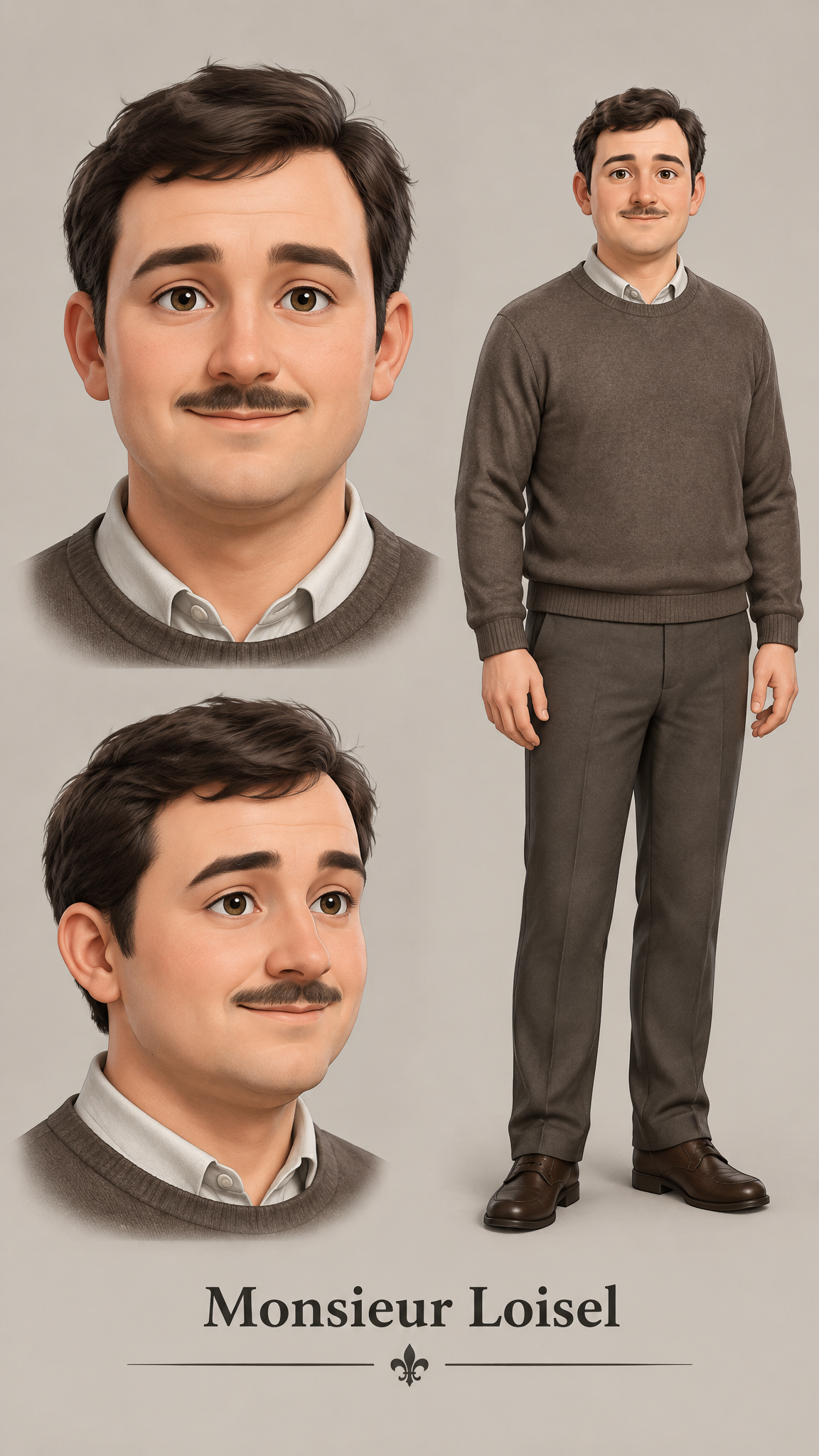
Story character
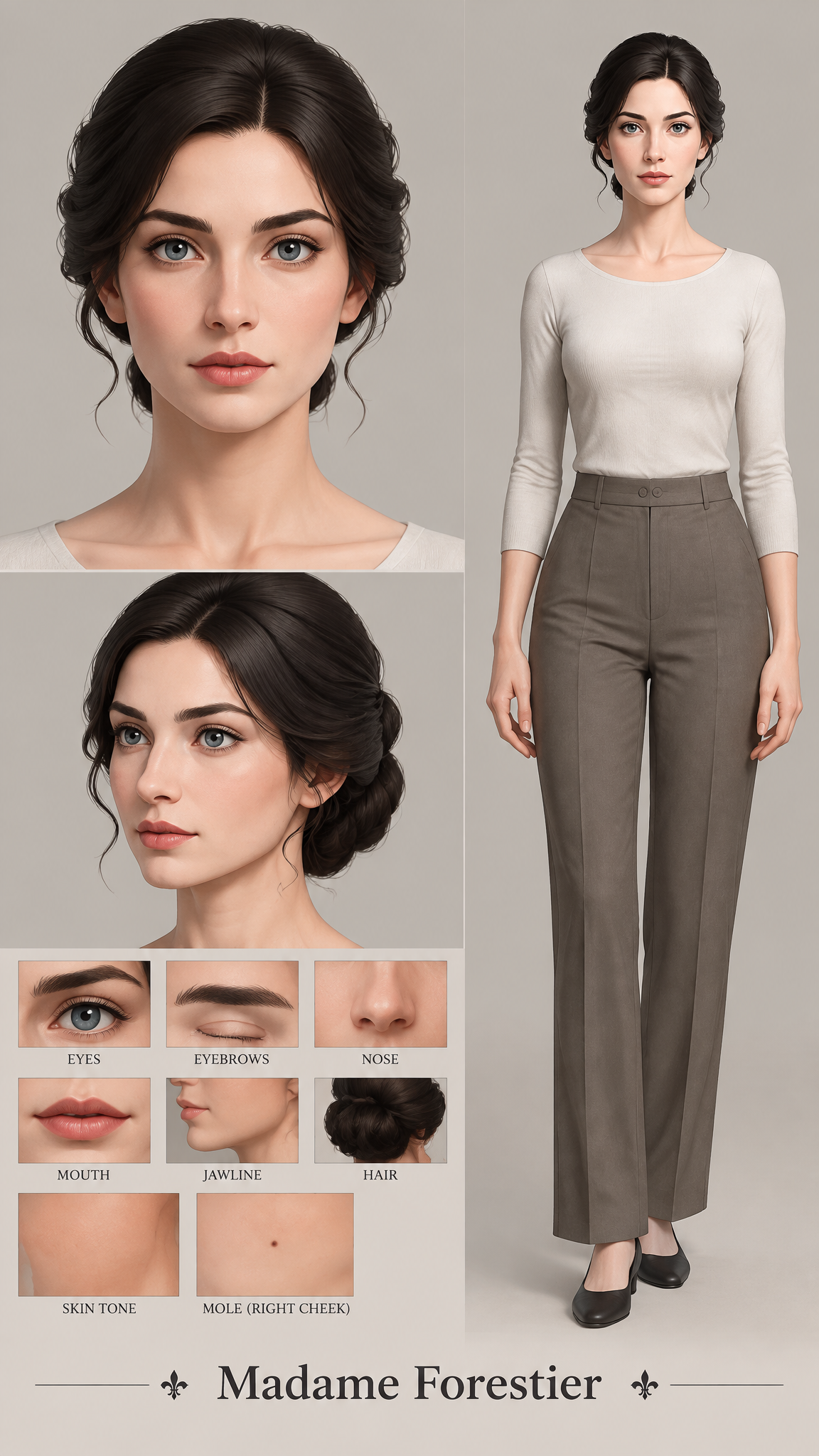
Story character
You never attach anything. You say "draw the next two chapters", and the pages appear under their chapters, in order.
Watch the full conversationHow to decide
- Under ten pages, one or two characters, done in a day: ChatGPT is fine, and you may already pay for it.
- A novel, a serial, or anything with chapters you will keep adding: use a project tool, or the bookkeeping will cost you more time than the drawing.
- Not sure: draw three chapters both ways — an early one, a much later one, and a busy scene — and compare the main character across them.
Frequently asked questions
Can ChatGPT make a comic with the same character on every page?
It can within one conversation, if you attach the same reference image to every request and repeat a fixed description. Over a long story with many sessions, keeping track of those references is manual work, and that is where drift usually creeps in.
Is a dedicated AI comic generator better than ChatGPT?
Not for everything. For a single page or a short strip, ChatGPT is quick and flexible. A project-based comic tool is better when the story is long: it stores each character once, attaches them to every page automatically, and keeps the pages in chapter order.
Can I use both?
Yes. Many writers brainstorm the look of a character or a scene in ChatGPT, then describe the final design when setting up the character sheet in a comic tool.
How much does a page cost on Novel2Comic?
10 credits per page at normal quality and 40 at high quality, refunded if a page fails. There is no subscription.
Let the library do the remembering
Bring a chapter, ask for it to be drawn, and see the cast come back on the next one.
Read the three-chapter test